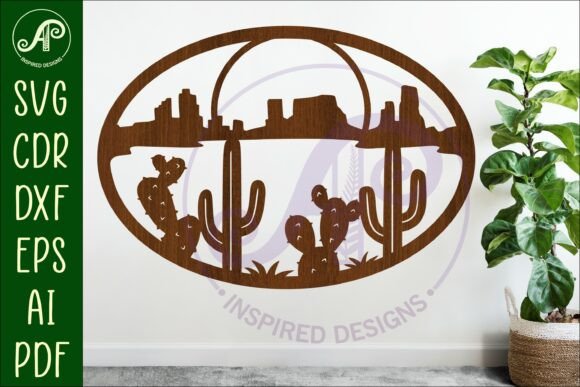
Bringing the Southwest Desert Wall Art SVG Monument to Life: A Guide for Makers
There is a distinct warmth and rugged elegance found in the landscapes of the American Southwest. Capturing that essence in a home decor piece, specifically through a Southwest Desert Wall Art SVG featuring iconic monuments, has become a favorite project for crafters and small business owners alike. Whether you are outfitting a cozy cabin, adding character to a living room, or creating inventory for your Etsy shop, digital files offer an incredible shortcut to professional results. However, the ease of clicking "download" often leads creators to skip crucial steps, resulting in wasted material, frustrated machine time, and finished products that don't quite match the vision.
This guide isn't just about celebrating the beauty of these designs; it is about ensuring you get the most out of your purchase. When you buy a digital download containing SVG, AI, PDF, CDR, and DXF files, you are buying potential. Realizing that potential requires attention to detail before you ever send a file to your laser cutter or craft machine.
Understanding the File Ecosystem
One of the most common misunderstandings involves the sheer variety of file formats included in a single zip folder. A typical high-quality listing provides multiple extensions to ensure compatibility with different software and hardware. You might see files labeled for CorelDraw (CDR), vector editing suites (AI, SVG), or standard printing (PDF). The mistake many beginners make is assuming all these files are identical duplicates. They are not.
For instance, if you are using a Glowforge or a similar diode laser, the SVG or DXF files are usually your best bet because they preserve clean vector paths essential for precise cutting. Conversely, if you are using a Cricut Explore or Maker, the SVG is often the native language of the machine, but sometimes the PDF offers a more reliable import if the SVG layers behave unexpectedly. Ignoring these distinctions and blindly uploading the first file you see can lead to broken paths or missing elements. Always open the files in your specific design software first to verify that the layers are intact and the cut lines are recognized correctly.
The Trap of Resizing Without Recalculating
A major selling point of digital downloads is scalability. The description likely notes that the design is formatted to be 29.5cm wide (approximately 12 inches) but can be resized to suit your needs. While technically true, this flexibility is where many projects go off the rails. Resizing a vector file changes the dimensions, but it does not automatically adjust the structural integrity of the design relative to your material.
Consider the intricate details often found in desert monument silhouettes or cactus shapes. If you scale the design down significantly to fit a small coaster or keychain, those fine lines may become too thin for your laser to cut cleanly without burning through the material or leaving fragile tabs that break during handling. On the flip side, scaling up a design meant for a 12-inch sign to a massive 4-foot wall feature might reveal pixelation if the original nodes weren't optimized, or worse, require joining multiple sheets of material in a way that ruins the aesthetic flow.
Better Approach: Before committing to a full sheet of expensive hardwood or acrylic, perform a test cut on a scrap piece of the same material at your intended size. Check the kerf (the width of the cut) and ensure that delicate bridges in the design hold up. If the design includes text or very fine spines on a saguaro illustration, you may need to manually thicken those vectors in your software after resizing.
Interpreting Cut Lines and Colors
In the world of laser cutting, color coding is everything. Many premium files, including those designed for the Southwest theme, come with exterior cut lines pre-colored in blue. This is a deliberate choice, as many laser software programs default to blue lines for cutting and red or black for engraving. A frequent oversight occurs when users import these files into software that doesn't recognize the color mapping, or they accidentally change the stroke color while adjusting the design.
If your machine treats a blue cut line as an engrave command, you will end up with a scorched outline rather than a clean cut, potentially ruining the workpiece. Similarly, if the file contains solid images intended for Cricut users, importing them into a laser program without converting strokes to paths can cause the machine to attempt to cut every single node individually, turning a five-minute job into an hour-long ordeal.
Always inspect the "Layers" or "Objects" panel in your software. Ensure that the lines designated for cutting are set to the correct stroke weight (usually hairline or 0.01mm) and the correct color profile required by your specific machine's driver.
Material Selection and Visual Impact
The beauty of a Southwest Desert Wall Art piece relies heavily on the contrast between the cut shape and the background. A common error is choosing a material that clashes with the theme or fails to highlight the silhouette. For example, cutting a dark walnut monument sign against a dark brown wall renders the art invisible. Conversely, using a bright, neon acrylic might undermine the rustic, earthy vibe associated with desert landscapes.
When planning your project, think about the environment where the sign will hang. For a cabin setting, natural woods like birch, maple, or reclaimed pine often yield the most authentic look. If you are aiming for a modern boho aesthetic, matte black metal or frosted acrylic might be more appropriate. Remember that the digital file is just the template; the material choice dictates the final emotional impact of the piece.
Verifying Your Purchase and Expectations
Finally, let's address the nature of the transaction itself. It is vital to remember that listings for these designs are for DIGITAL DOWNLOAD ONLY. No physical item will be mailed. While this seems obvious, confusion arises when buyers expect a finished product or physical templates. Once you purchase, you receive a zip folder. Inside, you will find the array of files mentioned earlier.
To avoid frustration, ensure you have the software capable of extracting zip folders and the specific CAD or design software needed to open the formats you intend to use. If you don't own CorelDraw, the CDR file is useless to you, but the SVG should work universally. If you lack vector software entirely, the PDF might serve as a printable template for manual tracing, though this defeats the purpose of automated cutting.
By taking a moment to understand the files, respecting the limits of resizing, verifying your machine settings, and choosing materials wisely, you transform a simple digital purchase into a stunning, handmade centerpiece. The Southwest Desert Wall Art SVG provides the blueprint, but your attention to detail builds the monument.